Hole Upper For 2 Players — Play Free Online
Made by the game’s developer and distributed through GameMonetize. We embed the official HTML5 build.
By William ZZ · Founder · Updated
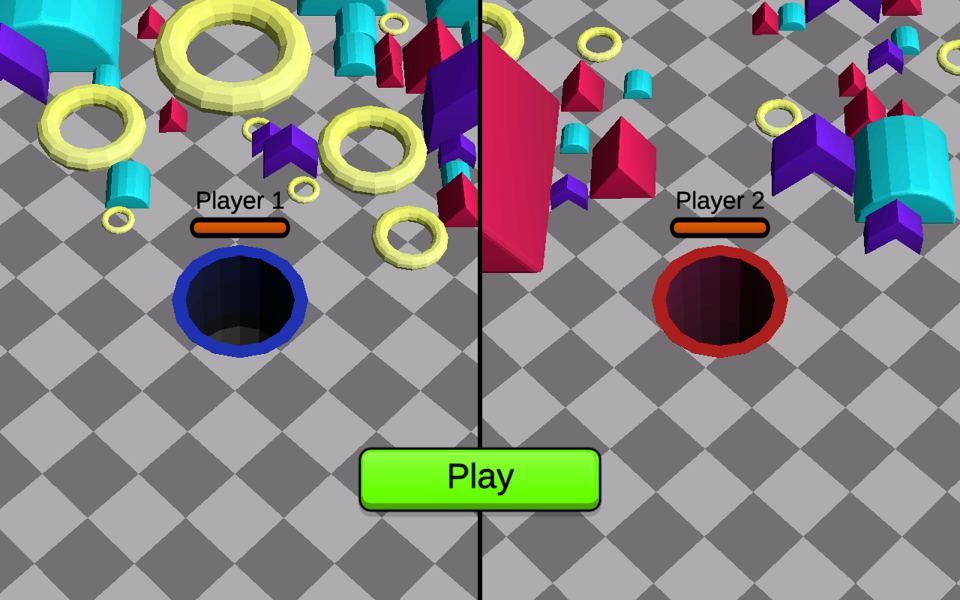
Hole Upper For 2 Players is a split-screen eating race for two people on one keyboard. Each player steers a hole across a checkered floor, swallows colored blocks and rings to grow, and tries to be bigger than the other hole when the countdown reaches zero.
How to play Hole Upper For 2 Players
The screen is split down the middle: Player 1 controls the blue hole on the left, Player 2 the red hole on the right. Press Play, and a timer starts at the top of the screen. Move your hole under the blocks, rings and shapes scattered around your half; anything small enough drops in and your hole grows. As it gets bigger, larger pieces start to fit.
The developer describes the goal simply: out-eat your opponent before the timer hits zero. In our test the round timer read 25 seconds when the first screenshot was taken and kept counting down. Rounds are timed, which makes it a good fit for quick rematches: play a round, swap seats, play again.
Hole Upper For 2 Players controls
| Key / input | Action |
|---|---|
| W A S D | Player 1: move the blue hole |
| ↑ ↓ ← → | Player 2: move the red hole |
| Touch | Drag the on-screen joystick to move the hole |
Controls come from the developer’s instructions on the official GameMonetize listing, plus key labels the game showed in our test where noted. Touch input: Drag the on-screen joystick to move the hole.
Player 1 uses W, A, S and D; Player 2 uses the arrow keys. There is no jump or action button: the only input is movement, which keeps it easy for younger players or anyone new to keyboard games. Click once inside the game window first so the keys reach the game.
Both players can share one laptop keyboard comfortably because the two key groups are at opposite ends. In our two-player test both holes responded to their own keys.
Tips to win Hole Upper For 2 Players
- Start with the smallest pieces. A small hole cannot swallow large shapes yet, so try clearing small blocks first.
- Sweep in lines instead of chasing single pieces. Try sweeping steadily across a dense cluster.
- Watch the size of large shapes near you. Once your hole is wide enough, the big pieces add size quickly.
- Keep an eye on the timer. Late in the round, go for the nearest pieces you can fit rather than crossing the board.
- Agree on hand positions before pressing Play so neither player reaches across the other.
Hole Upper For 2 Players on phones and tablets
The developer says both players can also drag an on-screen joystick to move, and GameMonetize marks the game as mobile ready. On a phone, two players would need to share one small screen; a tablet gives more room. We have only tested the game in desktop Chrome.
How Hole Upper For 2 Players loaded in our test
We opened the official embed of Hole Upper For 2 Players three times from a cold start in desktop Chrome (1280×800 window) on 16 Nov 2026 and recorded when the game canvas appeared and what the first screen showed. Canvas time is not the same as fully loaded: menus, ads and the first level can take longer. The three load runs stopped at the menu; any gameplay notes below come from a separate play check. We have not tested it on a phone or tablet; the mobile rows below come from the developer and GameMonetize.
| Canvas appeared (3 runs) | 1.4 s, 1.2 s, 1.5 s — your connection will change these times |
|---|---|
| First screen we saw | A split screen with Player 1’s blue hole on the left, Player 2’s red hole on the right and a green Play button. |
| After our input | In our two-player run a video ad played first; after it, pressing Play started a round with a countdown timer (25 s when our first screenshot was taken) and both holes moved with their own keys. |
| Video ad seen in our recorded test | Yes, from the game’s own ad system |
| GameMonetize “Mobile Ready” | Yes (listing read 15 Nov 2026) |
| Touch controls documented | Drag the on-screen joystick to move the hole |
| Published on GameMonetize | May 29, 2026 |
Hole Upper For 2 Players not loading or controls not working?
- Click once inside the game window before using the keyboard; until it has focus, key presses go to the page instead of the game.
- A video ad can play when you start. Wait for it to end (if a skip button appears, use it), then follow the game’s on-screen prompts.
- Ad blockers and strict school or work filters can stop the embed from loading. Allow html5.gamemonetize.co or try another network.
- Still broken? Tell us on the contact page and we will recheck it.
Hole Upper For 2 Players FAQ
Can two people play Hole Upper on the same computer?
Yes. Player 1 moves the blue hole with W, A, S, D and Player 2 moves the red hole with the arrow keys, on one keyboard and one split screen. In our test each hole responded to its own player’s keys.
How do you win Hole Upper For 2 Players?
Swallow blocks to grow, and be the bigger hole when the round timer runs out. The developer’s goal is to out-eat your opponent before the timer hits zero.
Is there a video ad before the game starts?
In our two-player run a video ad from the game’s own ad system played first. After it ended we pressed Play to start the round.
Can I play Hole Upper alone?
The developer only describes head-to-head play, and the start screen shows both players’ holes. One person can control both holes, but there is no computer opponent listed.


