3D Formula Racing: Pro Edition — Play Free Online
Made by the game’s developer and distributed through GameMonetize. We embed the official HTML5 build.
By William ZZ · Founder · Updated
3D Formula Racing: Pro Edition is a 3D formula car racer with a split-screen Double Player mode. Race through 20 stages against AI rivals that get faster and more aggressive as you progress, and use nitro to pass on the straights.
How to play 3D Formula Racing: Pro Edition
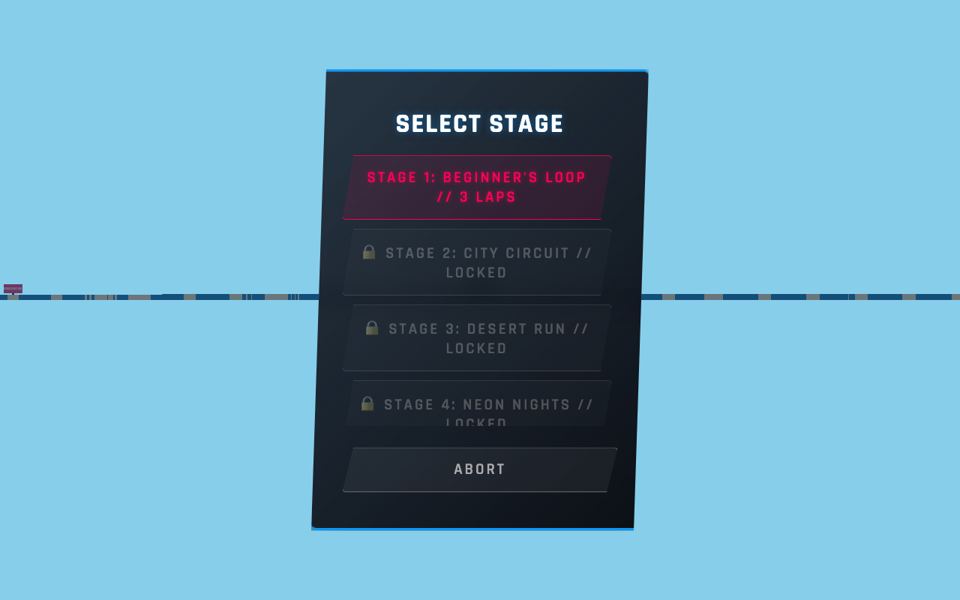
The menu offers Single Player, Double Player, Time Trial and System Config. For two players, choose Double Player, then a stage. In our test only Stage 1, Beginner’s Loop (3 laps), was unlocked; Stage 2 City Circuit, Stage 3 Desert Run and Stage 4 Neon Nights were locked. The screen then splits into two views, blue car left and red car right, each with its own position, lap counter, speedometer and track map.
The developer lists 20 stages, from neon cyberpunk cities to desert canyons and Martian landscapes, with a progressive difficulty system: as you clear levels, AI rivals become faster and more aggressive. Drifting around sharp corners and using nitro are the core skills.
3D Formula Racing: Pro Edition controls
| Key / input | Action |
|---|---|
| W A S D | Player 1: accelerate, steer left/right and brake |
| Left Shift | Player 1: nitro (NOS) boost |
| Arrow keys | Player 2 (split screen): accelerate, steer and brake |
| Enter | Player 2: nitro (NOS) boost |
Controls come from the developer’s instructions on the official GameMonetize listing, plus key labels the game showed in our test where noted. Touch input: the official instructions we read do not give a full touch-control map.
Player 1 drives with W, A, S, D (accelerate, steer left and right, brake) and boosts with Left Shift. Player 2 drives with the arrow keys and boosts with Enter. The menu repeats this as a key hint, so you can check it before the race.
In our test each car responded to its own player’s keys. Click inside the game window first.
Racing tips
- Save nitro for straights. Boosting into a corner makes it harder to turn.
- Brake before the corner, not in it, then accelerate out.
- Learn Beginner’s Loop first; it is the stage that is open from the start.
- Watch the track map in your half of the screen to see the next corner early.
- In Double Player, look only at your own half. It is easy to steer by the wrong view.
Phones, tablets and loading
GameMonetize marks the game as mobile ready, but the developer’s mobile instructions are cut off on the listing, so we cannot tell you the touch controls. We tested split-screen two-player play only with a keyboard in desktop Chrome; two-player play on a phone is untested. Of the seven games in our two-player collection, it was the slowest to show its canvas: 4.0 to 5.6 seconds.
How 3D Formula Racing: Pro Edition loaded in our test
We opened the official embed of 3D Formula Racing: Pro Edition three times from a cold start in desktop Chrome (1280×800 window) on 16 Nov 2026 and recorded when the game canvas appeared and what the first screen showed. Canvas time is not the same as fully loaded: menus, ads and the first level can take longer. The three load runs stopped at the menu; any gameplay notes below come from a separate play check. We have not tested it on a phone or tablet; the mobile rows below come from the developer and GameMonetize.
| Canvas appeared (3 runs) | 4.0 s, 4.1 s, 5.6 s — your connection will change these times |
|---|---|
| First screen we saw | A FORMULA RACING menu with Single Player, Double Player, Time Trial and System Config, and the key hint “P1: W,A,S,D | Boost: Shift / P2: Arrows | Boost: Enter”. |
| After our input | The next screen was Select Stage with only Stage 1 (Beginner’s Loop, 3 laps) unlocked. In our two-player run a video ad played after we picked the stage; the split-screen race then started and both cars responded. |
| Video ad seen in our recorded test | Yes, from the game’s own ad system |
| GameMonetize “Mobile Ready” | Yes (listing read 15 Nov 2026) |
| Touch controls documented | None listed by the developer |
| Published on GameMonetize | May 11, 2026 |
GameMonetize marks 3D Formula Racing: Pro Edition as mobile ready, but the developer does not document touch controls, so treat phone play as untested.
3D Formula Racing: Pro Edition not loading or controls not working?
- Click once inside the game window before using the keyboard; until it has focus, key presses go to the page instead of the game.
- A video ad can play when you start. Wait for it to end (if a skip button appears, use it), then follow the game’s on-screen prompts.
- Ad blockers and strict school or work filters can stop the embed from loading. Allow html5.gamemonetize.co or try another network.
- Still broken? Tell us on the contact page and we will recheck it.
3D Formula Racing: Pro Edition FAQ
Is 3D Formula Racing: Pro Edition split screen?
Yes. Double Player mode splits the screen: Player 1 uses W, A, S, D with Left Shift for nitro, Player 2 uses the arrow keys with Enter for nitro.
How many stages does 3D Formula Racing have?
The developer lists 20 stages. In our test only Stage 1, Beginner’s Loop (3 laps), was unlocked at the start.
Can I play 3D Formula Racing on my phone?
GameMonetize marks it mobile ready, but the developer’s touch instructions are cut off on the listing, so we cannot confirm the touch controls. We tested two-player split screen only on a desktop keyboard.
Does 3D Formula Racing show a video ad?
Yes. In our two-player run a video ad from the game’s own ad system played after we picked the stage. Wait for it to end before racing.


